
Mass Intentions Software
|
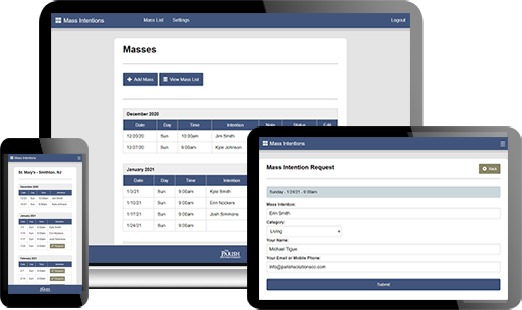
Managing Mass Intentions should be easy, seamless, and online...and now it is! Now you can manage the entire Mass Intention process from any internet connected device. And, parishioners can make requests online too. Don't worry, you can still add a request to our system for parishioners who walk or call in their requests. You can access and manage the intentions from anywhere, and you can link to the system from your website, social media, emails, and more. You can even collect donations by linking directly to your current online giving platform.
Simple Pricing
$55/month. No contract. |
|
Features
Mass Intentions Software
Pricing
$55/month (no contract required) |
Video TourFrequently Asked Questions (FAQ)
Can this connect to our current online giving?
Yes, our software can connect to your current online giving. After the user makes the request, they will see a donate button. This donate button will take them to your current online giving platform. You can adjust this button in the settings. You can also add your own notes before this button. Users can still pay by check or cash. Can the Mass intentions be limited per user?
Yes, you can limit the intentions per user per year and you can set a limit per month. These quantities can be adjusted in the settings area. All intentions must also be approved. So, you can also stop excessive requests through the normal approval process. The limit looks for the users email address or phone number. Can this be used for more than one location?
Yes, you can specify the location for each Mass time. We have several customers who have multiple campuses or locations as is common with Area Faith Communities, Clusters of Parishes, etc. The user will be able to see the location before making a request. Can there be more than one administrator?
Yes, you can share the admin password with as many people as you like. Can we control the dates that are shown? Yes, you can specify which dates are publicly viewable. You can do this by a rolling method such as showing x number of months at a time. You can also use the calendar method to set specific start and end dates. Both methods allow you to add in new Masses without the public being able to see them until you are ready. How long does it take to set up?
You will usually receive your login and password the same day you sign up. How are the Masses added?
As the admin, you add the Masses. We have a simple tool that lets you add each Mass up to multiple times at once. For example, you can add your Sunday 9:00am Mass for up to 2 years in advance if you'd like with just one button. Here is a tutorial to guide you: https://app.screencast.com/QlQOn8tIyFKSL |